

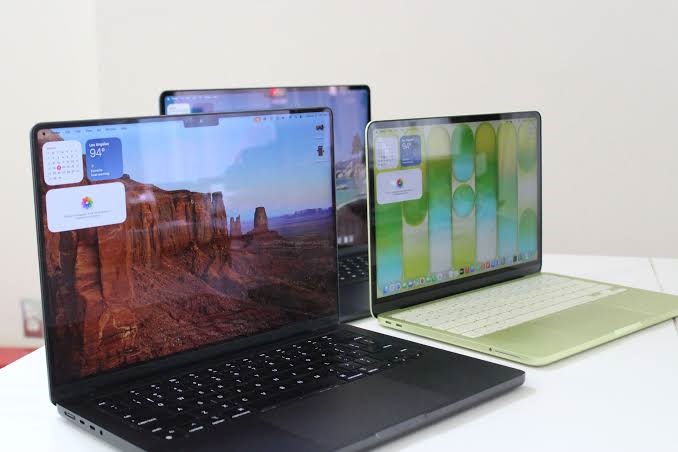
Choosing a laptop can feel like homework. Specs, chips, storage tiers, and prices that seem to change every few months. The good news is that the MacBook Air series is more straightforward than it appears, and for the majority of individuals, the choice boils down to a few straightforward inquiries about their actual lifestyle and work habits. Let’s go through them.
What’s actually on the shelf right now
In March 2026, Apple upgraded the MacBook Air with a faster SSD and M5 chip. There are two sizes: 13.6-inch and 15.3-inch models that share the same design. Apple calls them the 13-inch and 15-inch, so I’ll do the same.
The two sizes are closer than you’d expect. Price, display size, and speakers are the only real differences between them. In other words, you’re mostly choosing a screen size and a weight, not a different kind of computer.
A few other things came with the refresh. Wi-Fi 7 and Bluetooth 6 are now supported, while the Air’s base storage has increased to 512GB. Sky Blue, Silver, Starlight, and Midnight are its four available colors.
A quick word on price
This is where things got more complicated. At launch, the 13-inch M5 Air cost $1,099. Then, in late June, Apple raised prices, saying it could no longer shield customers from soaring memory and storage chip costs driven by the AI industry’s datacenter buildout. The current starting prices for the 13-inch and 15-inch are $1,299 and $1,499, respectively.
Prices may have moved again since then, so check Apple’s site or a retailer before you commit. Also, an older-generation model sold at a discount can be a smart buy if you find one. The M5 is faster, but it’s not so dramatically better that a good deal on an M4 should scare you off.
Question one: How much do you carry your laptop?
This is the question that matters most, and people tend to underestimate it.
The 13-inch model weighs about 1.23 kg, while the 15-inch weighs about 1.51 kg. That’s roughly a quarter of a kilogram of difference. On a desk, you’ll never notice. In a backpack that you carry across campus, onto trains, and into cafés five days a week, you absolutely will.
If your laptop travels with you daily, the 13-inch is the better pick. It slides into a bag without a fuss, fits on those tiny airplane tray tables, and doesn’t make you think about it. If your laptop mostly lives on a desk or sofa and only occasionally leaves the house, the weight argument gets a lot weaker.
Question two: How much screen space do you need?
Here’s the thing about the 15-inch: it isn’t just bigger, it’s roomier. The 13-inch has a 2560-by-1664 resolution, while the 15-inch has 2880-by-1864, both at 224 pixels per inch. The sharpness is the same, but you get more canvas.
That extra space earns its keep if you:
- Keep two windows side by side all day (a document and a browser, say)
- Edit photos or video
- Work with big spreadsheets
- Spend long hours on video calls while taking notes
- Simply find small screens tiring
If your day is mostly email, web browsing, streaming, and writing, the 13-inch is plenty. I’d honestly say most people overestimate how much screen they need until they’ve lived with a smaller one for a month.
Question three: Which chip configuration?
Both sizes run Apple’s M5 chip, which keeps things refreshingly uncomplicated. There is one small wrinkle worth knowing about. While the 15-inch only has the 10-core GPU, the 13-inch gives a choice between an 8-core and a 10-core GPU.
What does that mean in real life? If you’re doing everyday work, the 8-core GPU is fine. You won’t feel the difference when you’re writing, browsing, or video chatting. If you edit video, play games, or work with graphics-heavy apps, the 10-core option gives you a bit of extra headroom. It’s a modest bump, not a game changer.
The bigger decision is usually memory and storage, not the chip. Memory is the one spec you can’t upgrade later, so if you tend to keep dozens of browser tabs open, run several apps at once, or plan to keep this laptop for five or six years, it’s worth paying for more. Storage is a little more forgiving, since external drives and cloud services can fill the gaps, but don’t undersell yourself if you work with large files.
Who should pick the 13-inch
Choose the 13-inch if you’re a student, a commuter, a frequent traveler, or anyone who wants a laptop they barely notice carrying. It’s also the cheaper option, which matters more than ever right now. You get the same chip family, the same design, and the same battery-friendly efficiency in a more pocketable form.
It’s the right call for most people. If you’re unsure, start here.
Who should pick the 15-inch
Choose the 15-inch if your laptop is your main computer and you don’t plug it into a monitor. It’s a lovely fit for people who work from home, creative hobbyists, and anyone who has ever squinted at a cramped screen and thought, “I just need a little more room.”
It also tends to feel more like a desktop replacement. You pay extra and carry a bit more weight, but you gain comfort every single day you use it.
And if you’re looking at the price tag and wincing?
Fair. A $1,299 starting price is a lot for many households, and there are alternatives within Apple’s own lineup. The entry-level MacBook Neo now costs $699, up from $599. If your needs are light, like browsing, schoolwork, streaming, and documents, that’s worth a serious look.
On the other end, don’t jump to a Pro unless you have a reason. The current starting price for the MacBook Pro with 1TB of storage is $1,999. Pros make sense for heavy video editing, 3D work, software development with big builds, and other sustained demanding tasks. If that isn’t you, the Air is already more laptop than most people need.
Should you upgrade from an older Air?
Probably not, and I’d rather tell you that than sell you something. If you already own an Air with an M3 or M4 chip, upgrading to the M5 doesn’t make a lot of sense. Those machines are still fast, still pleasant, and will keep serving you for years. Upgrade when something is actually holding you back, not because a new model exists.
If you’re coming from an Intel MacBook or an early M1, that’s a different story. The jump will feel significant, especially in battery life, speed, and display quality.
A simple cheat sheet
Here’s the short version if you just want an answer:
- Student or commuter: 13-inch, standard configuration.
- Remote worker who wants more space: 15-inch.
- Light everyday use on a tight budget: Look at the MacBook Neo, or hunt for a discounted older Air.
- Creative hobbyist: 15-inch with the 10-core GPU and extra memory.
- Professional doing heavy video or 3D work: Skip the Air and look at a MacBook Pro.
- Already own an M3 or M4 Air: Keep it.
Conclusion
The best MacBook Air is the one that disappears into your routine. For most people, that’s the 13-inch: light, capable, and easier on the wallet. If you crave screen space and your laptop rarely leaves the house, the 15-inch is a joy. Either way, you’re getting a quiet, fast, long-lasting machine that handles what most of us throw at it.
Think about how you’ll use it on an ordinary Tuesday, not on your most ambitious day. Buy for that person, and you’ll be happy.